
A Raspberry Pi-based stomp box designed to be controlled from a phone or tablet.


 _To download PiPedal v2.0.102, click [*here*](download.md).
To view PiPedal documentation, click [*here*](Documentation.md)._
Use your Raspberry Pi, or Ubuntu amd/x86-64 computer as a guitar effects pedal. Configure and control PiPedal remotedly, with your phone or tablet, or via a web browser.
PiPedal running on a Raspberry Pi 4 or Pi 5 provides stable super-low-latency audio via external USB audio devices, or internal Raspberry Pi audio hats.
PiPedal runs on Raspbery Pi OS (Bookworm or Trixie), or Ubuntu 24.x or later (amd64/x86-64 and aarch64). Make sure you follow the [Ubuntu post-install
instructions](https://rerdavies.github.io/pipedal/Configuring.html) to make sure your Ubuntu OS is using a realtime-capable kernel.
{% include gallery.html %}
## New in PiPedal v2.0:
- Support for Neural Amp Modeler (NAM) A2 models.
- Direct single-step downloads of NAM A2 models to the Pipedal server using web services provided by Tone3000.com.
- Install PiPedal as a Progressive Web App (PWA) on your Windows or Apple desktop or laptop in order to run PiPedal as a native application, without the clutter of browser chrome, address bars, and needless decorations.
- A new Channel Routing dialog which allows you to pass through Auxilliary audio channels, or unprocessed guitar inputs for later re-amping in a DAW or external hardware.
- New NAM A2-based Factory Presets, and a small selection of NAM A2 models pre-installed and ready to use.
PiPedal includes state-of-the-art AI-based guitar amp emulation, using the TooB Neural Amp Modeler plugin, which now includes support for the brand new NAM A2 technology. NAM A2 provides event more accurate amp simulations than NAM A1, while using even less CPU. Experience the ground-breaking quality of NAM A2 models now, with PiPedal's low-latency audio engine running on your Raspberry Pi or Ubuntu AMD64/x86_64 computer.
NAM changes everything! Again! NAM A2 models provide even better quality, and even lower CPU use that the previous NAM A1 models did. And NAM A2 provides amp and effect emulations that are demonstrably, and measurably better than competing commercial amp modeling technologies. And it is available for free to PiPedal users now!
_To download PiPedal v2.0.102, click [*here*](download.md).
To view PiPedal documentation, click [*here*](Documentation.md)._
Use your Raspberry Pi, or Ubuntu amd/x86-64 computer as a guitar effects pedal. Configure and control PiPedal remotedly, with your phone or tablet, or via a web browser.
PiPedal running on a Raspberry Pi 4 or Pi 5 provides stable super-low-latency audio via external USB audio devices, or internal Raspberry Pi audio hats.
PiPedal runs on Raspbery Pi OS (Bookworm or Trixie), or Ubuntu 24.x or later (amd64/x86-64 and aarch64). Make sure you follow the [Ubuntu post-install
instructions](https://rerdavies.github.io/pipedal/Configuring.html) to make sure your Ubuntu OS is using a realtime-capable kernel.
{% include gallery.html %}
## New in PiPedal v2.0:
- Support for Neural Amp Modeler (NAM) A2 models.
- Direct single-step downloads of NAM A2 models to the Pipedal server using web services provided by Tone3000.com.
- Install PiPedal as a Progressive Web App (PWA) on your Windows or Apple desktop or laptop in order to run PiPedal as a native application, without the clutter of browser chrome, address bars, and needless decorations.
- A new Channel Routing dialog which allows you to pass through Auxilliary audio channels, or unprocessed guitar inputs for later re-amping in a DAW or external hardware.
- New NAM A2-based Factory Presets, and a small selection of NAM A2 models pre-installed and ready to use.
PiPedal includes state-of-the-art AI-based guitar amp emulation, using the TooB Neural Amp Modeler plugin, which now includes support for the brand new NAM A2 technology. NAM A2 provides event more accurate amp simulations than NAM A1, while using even less CPU. Experience the ground-breaking quality of NAM A2 models now, with PiPedal's low-latency audio engine running on your Raspberry Pi or Ubuntu AMD64/x86_64 computer.
NAM changes everything! Again! NAM A2 models provide even better quality, and even lower CPU use that the previous NAM A1 models did. And NAM A2 provides amp and effect emulations that are demonstrably, and measurably better than competing commercial amp modeling technologies. And it is available for free to PiPedal users now!
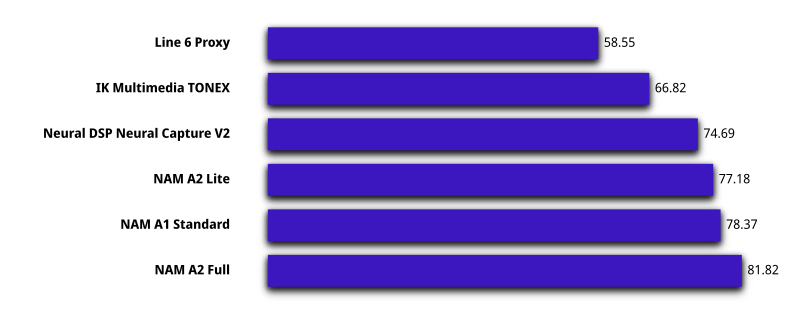
Fig 1: Unscreened ratings from a large-scale blind MUSHRA listening test evaluating NAM A2 amp/effect modeling against other commercial modelers. 105,842 ratings from 1,184 participants across 37 tones. Data provided by TONE3000 and Steve Atkinson under a CC-BY 4.0 license. 1
PiPedal 2.0 integrates with Tone3000.com's web services, allowing you to directly install new NAM A2 models on the pipedal server without ever leaving the PiPedal user interface. Or you can download and install commercially-developed NAM models from a rich ecosystem of model providers. {% include demo.html %} PiPedal can be remotely controlled via a web interface over Ethernet, or Wi-Fi. If you don't have access to a Wi-Fi router, PiPedal can be configured to start a Wi-Fi hotspot automatically, whenever your Raspberry Pi can't connect to your home network. Install the [PiPedal Remote Android app](https://play.google.com/store/apps/details?id=com.twoplay.pipedal) to get one-click access to PiPedal via Wi-Fi networks, or Wi-Fi hotspots. If you are using PiPedal away from home, you can configure PiPedal to automatically start a Wi-Fi hotspot whenever Pipedal is unable to detect your home network (Raspberry Pi OS only). The PiPedal Client Android app will allow to connect by simply launching the app, whether you are at home, or using a Wi-Fi auto-hotspot at a gig, when away from home. PiPedal's user interface has been specifically designed to work well on small form-factor touch devices like phones or tablets. Clip a phone or tablet on your microphone stand on stage, and you're ready to play! Or connect via a desktop browser, for a slightly more luxurious experience. The PiPedal user-interface adapts to the screen size and orientation of your device, providing easy control of your guitar effects across a broad variety devices and screen sizes. PiPedal includes a pre-installed selection of LV2 plugins from the ToobAmp collection of plugins; but it works with most LV2 Audio plugins. There are literally hundreds of free high-quality LV2 audio plugins that will work with PiPedal. Just install them on your Raspberry Pi, and they will show up in PiPedal. If your USB audio adapter has MIDI connectors, you can use MIDI devices (keyboards, controllers, or midi floor boards) to control PiPedal while performing. A simple interface allows you to select how you would like to bind PiPedal controls to midi messages.1 TONE3000, & Atkinson, S. (2026). A2 MUSHRA Listening Test Raw Data [Data set]. Tone3000. https://www.tone3000.com/guides/nam-a2-the-complete-guide . Repository: https://github.com/tone-3000/a2-mushra-data . License: CC BY 4.0. ↩